
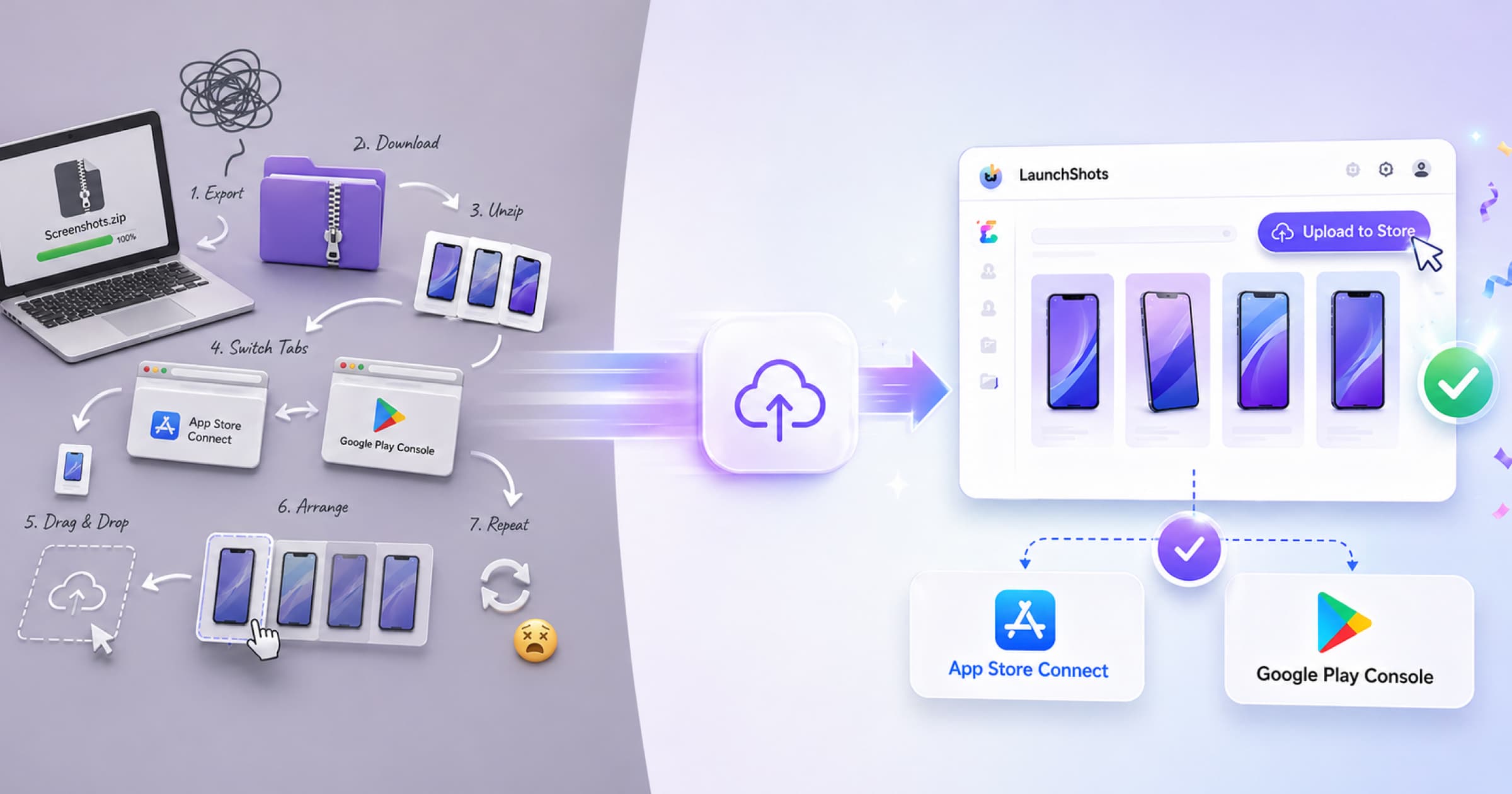
The End of the "Manual Upload" Era: Meet Direct Upload
Skip the download-unzip-reupload shuffle. Direct Upload sends your screenshots straight from LaunchShots to App Store Connect and Google Play Console — from design to deployment, seamlessly.
From design to deployment — seamlessly.
Are you still stuck in the loop of downloading screenshots, switching tabs, and manually uploading them to App Store Connect or Google Play Console — right at the moment you're ready to ship?
It's a rhythm we all know too well. You finish your screenshots, they look incredible, and you're ready to show the world...
But then you realize there are still a dozen manual steps left before you're actually live!
So we thought — why not remove that step entirely?
Introducing Direct Upload
We're excited to introduce Direct Upload to App Store Connect and Google Play Console — a simpler way to upload screenshots to app stores.
Now, you can move from design to deployment without ever leaving the platform.
- No more downloads.
- No more switching tabs.
- No more manual uploads.
Just a more direct and smooth path from creation to store listing.
Stay in your flow
You might be thinking: “Is manual uploading really that hard?”
If you've ever actually done it, you know the answer is a resounding “yes”.
It's not just one upload; it's a multi-step hurdle. You have to create and download screenshots, switch between platforms, follow different workflows for each store, and manually arrange images in the right order.
Maybe at a glance, it sounds simple. In practice, it's exhausting.
Let's make this real
Imagine you're launching your app on the App Store and you've created screenshots for both iPhone and iPad.
Now, you have to go through the entire upload process twice — once for each device.
Then, imagine if that app supports 5 different languages.
That's no longer two uploads now. That's 10 separate, repetitive workflows.
The same steps. Again and again.
Upload. Arrange. Adjust. Repeat.
And remember, that's just for the App Store. If you're publishing on the Play Store as well, you go through a similar process all over again.
Now, isn't that hard?
It's friction — the kind of busywork that pulls you right out of your creative flow just as you're crossing the finish line.
At the end of the day, every minute spent on “process” is a minute taken away from “building.”
We didn't build this to give you another tool to learn; we built it to remove a hurdle you shouldn't have to jump over.
It's about making the transition from creation to release feel like one continuous breath.
So, let's see how this continuous breath goes:
How it works
- Generate your screenshots.
- Click Upload to Store.
- Connect your App Store Connect / Play Console (one-time setup for first-time users).
- Select your app, device, and language.
- Upload.
That's it. Nothing more.
If you manage multiple apps or clients, you can connect multiple store accounts and switch between them easily. Once connected, everything just works.
We've done the heavy lifting behind the scenes to make your experience light. So once you're connected, it's just a breeze. You stay focused, and ship faster.
Then comes another doubt: is it safe and secure?
Built on official integrations
Your data and assets are handled using official Apple and Google systems, so everything stays:
- Secure
- Reliable
- Fully compliant with store requirements
Your store credentials are encrypted at rest and transmitted over secure connections, so nothing sensitive ever sits in plain text. We only use them to upload the assets you've asked us to upload — and you stay in control of access at all times.
Our goal is simple: get your app shipped without the headache. So we removed the unnecessary constraints.
The old way vs. the new way
| The “Manual Shuffle” (Old Way) | Direct Upload (New Way) |
|---|---|
| Export & download zip files | No downloads required |
| Find and unzip folders on your desktop | Instant cloud-to-cloud transfer |
| Open multiple browser tabs for each store | Stay in your workspace |
| Drag-and-drop assets one by one | One-click “Upload to Store” |
| Momentum lost in the admin work | Stay in the zone and keep shipping |
A better way to ship
We believe that publishing your hard work should feel as polished as the work itself. Direct Upload isn't just a technical update — it's about making your release day a little less stressful and a lot more satisfying.
The road ahead
This is just the first step in our mission to make app deployment totally seamless. We're already working on the next set of tools to help you get your ideas into users' hands faster than ever.
From your first draft to the live store — it's finally one seamless flow. Letting the momentum jump the wall ahead. No friction. Just shipping.
We can't wait to see what you ship!
Stop the shuffle. Ship without leaving the canvas.
Connect your store once. Every upload after is a single click — your release day, finally as polished as your screenshots.